

Google Search Console now shows how often your pages appear in AI Overviews and AI Mode.
It counts impressions. It does not count clicks.
The new Generative AI tab appeared in our own property out of the blue. No email or announcement.
This article covers what the report shows, what it leaves out, and how to use it.
Key Takeaways
- The Generative AI performance report is showing up across Search Console properties now, including ours. Google has not announced a full rollout and its own documentation still says "a subset of website owners"
- You get impressions, pages, countries, devices and dates, at hourly, daily, weekly or monthly granularity
- You do not get clicks. No CTR, no queries, no average position
- It covers AI Overviews and AI Mode. Discover has its own separate report
- This is not new traffic. It is a filtered view of impressions already counted inside your existing Web search totals
- Treat it as a visibility scoreboard, not a traffic report
What Google Shipped
Google announced the Generative AI performance reports on 3 June 2026 and said it was going out to a subset of sites first for testing.
The report shows five things. Impressions, meaning how often URLs from your site appeared in generative AI features. Pages, meaning which URLs turned up. Countries. Devices. And dates, with hourly, daily, weekly and monthly views.
Coverage is AI Overviews and AI Mode. Google expects that list to grow as Search changes.
One detail most coverage skips: the data is pulled from the Web search type you already had. Your totals do not go up. Google split out a slice you were already being credited for and gave it its own tab.
So if you were hoping this explains a traffic gap, it does not. It shows where some of your existing impressions were sitting.
How to Find the Report
Open Search Console, click Performance in the left sidebar, and look for Generative AI nested underneath it.
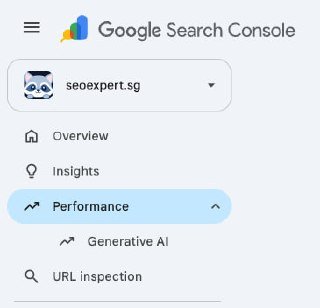
That is our property.
If you do not see it, Google's help documentation gives two reasons. Either your property is not in the rollout yet, or your site has not received enough impressions in AI features to populate the report.
One caveat on the "live for everyone" headlines. Barry Schwartz reported that the report appeared across every profile he checked, which matches what we are seeing. But Google has not confirmed a full rollout, and the official docs still say subset. Both things can be true at once. If yours is missing, nothing is wrong with your site.
The Missing Number
No clicks. No click-through rate, no queries, no average position. Impressions and nothing else.
That gap has drawn fair criticism. Knowing a page collected 40,000 AI impressions tells you Google found it useful enough to surface. It does not tell you whether anyone visited because of it.
We have written before about traffic disappearing while rankings hold steady. This report measures the exact moment that happens, without telling you the outcome.
Still, impressions-only is not useless. It is the first time Google has confirmed, per URL, that your content appears in AI answers at all. Before this, tracking AI visibility meant third party tools and a lot of manual prompting.
What the Data Is Good For
Four things, in the order I would do them.
Find your AI workhorses. Sort pages by impressions. The URLs at the top are the ones Google trusts on your topic. That is a content signal you did not have last month, and it is often not the page you expected.
Compare AI and classic search. Check your top AI impression pages against your top organic pages. When a page performs in one and not the other, that is a structural clue. Pages cited by AI tend to answer a question cleanly, early, and in plain language.
Watch the trend, not the daily number. Use weekly or monthly views. Daily AI impression data is noisy, and the newest data is preliminary, which Google marks with a dotted line on the chart. A two day dip is not a crisis.
Segment by country. For Singapore businesses this matters more than most places. If your impressions come mostly from outside your market, your content is being cited to the wrong audience, and that is a targeting problem before it is an optimisation problem.
A few limits to keep in mind. The table caps at 1,000 rows like the standard performance report. Dates run on Pacific Time. Page data is assigned to the canonical URL, not to duplicates, so a messy canonical setup will muddy the report. There is an export button, and it is worth using monthly, because your own saved history is the only baseline you control.
What I Would Not Do With It
Do not report AI impressions to a client as if they were traffic. They are not traffic, and presenting them that way sets up an awkward conversation later.
Do not restructure your site off two weeks of data.
And do not assume high impressions mean AI is sending people to you. It just means you were shown.
The fair reading is that appearing in AI Overviews is a brand visibility play as much as a traffic play. Being the source that gets quoted builds recognition even when nobody clicks. That is uncomfortable if you only measure sessions, but it is the direction search is moving.
The Honest Read
This report is Google acknowledging that AI features are a distinct surface worth measuring separately. That acknowledgement matters more than the data itself.
It also leaves the biggest question unanswered: what AI Overviews are doing to click volume. Google has said it may add more metrics over time.
So use it for what it is. A visibility scoreboard showing which of your pages AI features quote. Export it monthly, watch the trend, and resist checking it daily.
If you want help reading your own report, or you want content structured so it gets cited, that is the work we do as a GEO agency in Singapore. Our SEO services in Singapore and our AI visibility work run together, because splitting them stopped making sense.
Not sure whether your impressions mean anything? Talk to us. An experienced SEO consultant in Singapore should be able to tell you in one look whether a number matters, and a Singapore SEO expert should say so plainly when it does not.
If some terms in the report are unfamiliar, our SEO glossary covers the basics in plain language.