
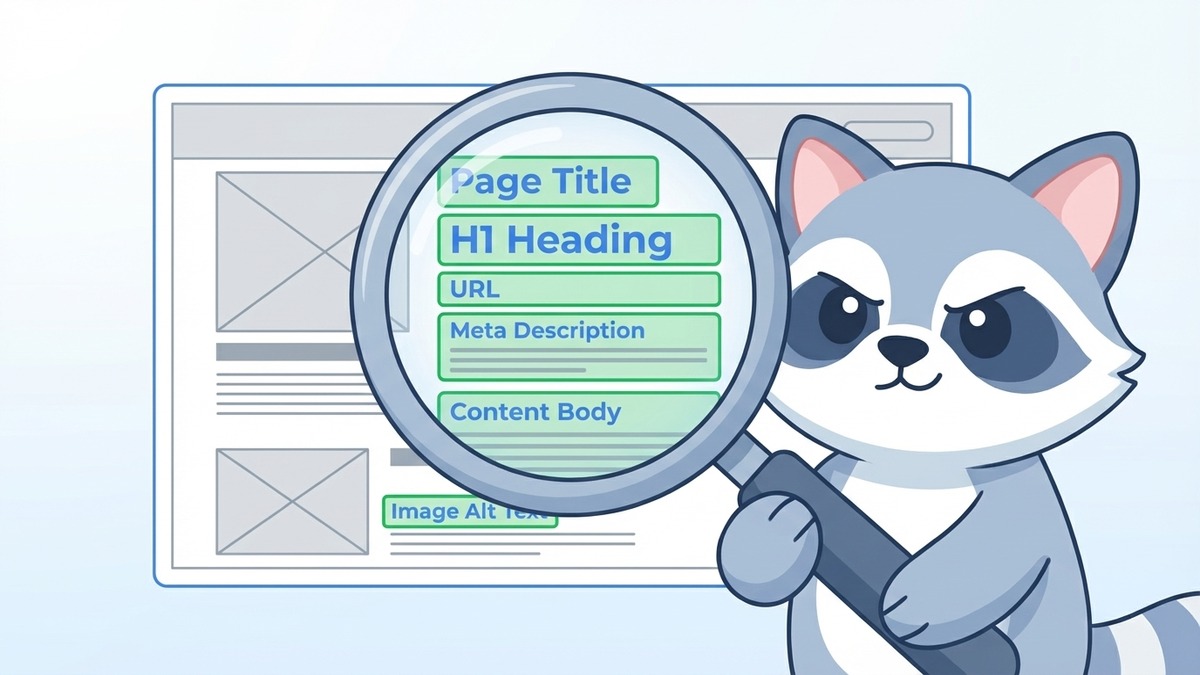
Keyword placement refers to the specific locations on a webpage where you put your target keywords so search engines can identify your content's topic and rank you accordingly. The most important locations are: the title tag, URL slug, H1 heading, first paragraph, H2 subheadings, image alt text, and meta description. Getting keyword placement right is not about repeating words endlessly. It's about putting the right keywords in the right spots so Google's crawlers can read your content clearly.
Most Singapore business owners do the hard work of finding keywords. Then they bury them in places Google barely reads. This guide fixes that.
Key Takeaways
- Your primary keyword must appear in the title tag, H1, and first paragraph of every page
- URL slugs should be short and contain your target keyword
- Keyword density (how often you repeat keywords) matters far less than keyword placement in the right spots
- SEO keywords are NOT case sensitive: "florist singapore" and "Florist Singapore" are treated identically by Google
- Stuffing keywords into every sentence will hurt your rankings, not help them
- Secondary keywords belong in H2 subheadings and throughout the body naturally
- Image alt text is one of the most consistently overlooked keyword placement spots
Why Placement Beats Repetition
Before the specific locations, let's address the biggest misconception in DIY SEO: more keywords equals better rankings.
It doesn't. In fact, repeating your keyword too many times (a practice called keyword stuffing) signals spam to Google and actively suppresses your rankings. Google's Panda algorithm update specifically targeted thin, over-optimised content, and that philosophy still governs how Google evaluates pages today.
What matters is WHERE your keyword appears, not how many times it shows up.
Certain locations on a page carry more weight with search engines than others. Placing your keyword in those high-value spots once signals relevance clearly. Cramming it into every paragraph signals nothing except that you're trying too hard.
This is also why understanding what SEO tags are matters: many of the highest-value keyword placement spots are HTML tags, not visible body text.
The 8 Places Your Keywords Need to Be
1. The Title Tag
This is the most important keyword placement on your entire page.
The title tag appears as the clickable blue headline in Google search results. Google uses it as a primary signal for what your page is about. Placing your target keyword here, ideally near the beginning, tells Google immediately: "This page is about THIS topic."
For a Singapore florist trying to rank for "roses Singapore delivery," a strong title tag looks like this:
Good: Roses Singapore Delivery | Same-Day Fresh Roses | Petal Studio Weak: Petal Studio | Your Premier Floral Experience Singapore
The first version leads with the keyword. Google can parse it immediately. The second version buries useful information behind a brand name that new customers haven't heard of yet.
Keep title tags under 60 characters. Use the SERP simulator to preview your title before publishing.
2. The URL Slug
Your URL slug is the part after your domain name:
www.petalstudio.sg/roses-singapore-delivery
The slug in the example above is /roses-singapore-delivery. It contains the keyword. Google reads URLs and uses them as a relevance signal.
Best practices for keyword-optimised URLs:
- Use hyphens between words (not underscores or spaces)
- Keep slugs short and descriptive
- Include your primary keyword
- Avoid numbers, dates, or auto-generated strings like
?p=1234
Once a URL is indexed and ranking, avoid changing it. Changing a URL without setting up a redirect loses any ranking power the original URL had accumulated.
3. The H1 Heading
Every page should have exactly one H1 tag. This is the main heading visible to users at the top of your content. It should contain your primary keyword and clearly state what the page covers.
The H1 doesn't have to be word-for-word identical to your title tag, but it should be closely aligned.
Title tag: Roses Singapore Delivery | Same-Day Fresh Roses | Petal Studio H1: Fresh Roses in Singapore: Same-Day Island-Wide Delivery
Both contain the core keyword. The H1 can be slightly longer and more natural-sounding since it's meant for readers, not the character limits of search result listings.
4. The First Paragraph (First 100 Words)
Search engines pay extra attention to the opening of your content. The first paragraph should naturally include your primary keyword, ideally in the first two sentences.
This matters for two reasons:
First, it confirms to Google that your page is genuinely about the topic your title and H1 promised. Second, when Google pulls a text snippet to show under your listing (or use in an AI Overview), it frequently grabs from the first paragraph. A keyword-containing opening increases the chance your snippet gets surfaced.
You'll notice that every article on the SEOExpert blog opens with a direct, keyword-containing statement. This is intentional. Our guide to how SEO actually works explains the crawler logic behind why opening paragraphs carry extra weight.
5. H2 Subheadings
H2 tags are your section headings, the subheadings that break your content into digestible chunks. These are excellent spots for secondary keywords: related terms, long-tail variations, and supporting topics.
Using a Singapore florist example, if the primary keyword is "roses Singapore delivery," relevant secondary keywords for H2s might include:
- "Same-day flower delivery Singapore" (H2: How Same-Day Delivery Works)
- "Order roses online Singapore" (H2: How to Order Online)
- "Best roses for birthdays Singapore" (H2: Choosing the Right Roses for Any Occasion)
Google reads heading structure as a content outline. H2s that contain relevant secondary keywords reinforce the overall topical authority of your page.
6. Image Alt Text
Alt text is the written description attached to every image on your page. Google cannot visually process images the way humans can. Alt text is how it understands what an image shows and whether it's relevant to the page topic.
Placing your keyword or a close variation in your image alt text serves multiple purposes:
- Reinforces the page's topic in a non-text element
- Helps your images rank in Google Image Search (a meaningful traffic source)
- Improves accessibility for users relying on screen readers
Weak alt text: image001.jpg (no alt text at all) Mediocre alt text: roses (too vague) Strong alt text: red roses same-day delivery Singapore (descriptive, includes keyword naturally)
Don't keyword-stuff alt text either. "roses singapore roses delivery singapore roses florist singapore" is spam, not optimisation.
7. The Meta Description
Meta descriptions don't directly influence your keyword rankings. However, they do influence whether people click on your listing. And click-through rate is an indirect ranking signal.
Including your keyword in the meta description has one additional benefit: when a user searches that keyword and it appears in your description, Google bolds it. Bolded keywords in your description make your listing stand out visually, which tends to increase clicks.
Write meta descriptions between 150 and 160 characters. Include the keyword naturally in the first sentence where possible.
8. Body Content (Sparingly and Naturally)
The main body of your content should include your target keyword and related terms, but without forcing it. A good general guide: for a 1,500-word article, your primary keyword should appear 3 to 5 times total (including the title, H1, and first paragraph already counted above).
More important than keyword frequency in the body is topical completeness. Google evaluates whether your content covers the topic comprehensively. Using semantically related terms (for a florist: "bouquet," "arrangement," "stems," "delivery," "same-day") signals depth and expertise. These related terms are often called LSI keywords (Latent Semantic Indexing), and they contribute to how thoroughly Google understands your page.
Are SEO Keywords Case Sensitive?
No. Google treats "florist singapore," "Florist Singapore," and "FLORIST SINGAPORE" as identical. Capitalisation has zero impact on how keywords are processed by search algorithms.
This means you don't need to worry about capitalising keywords in your title tags, headings, or content to match how users type them. Focus on natural, readable capitalisation (sentence case for body text, title case for headings) and let Google handle the matching.
Keyword Placement for Different Page Types
Homepage: Primary keyword should be your core brand term or most valuable service keyword. E.g., "florist Singapore" or "digital marketing agency Singapore."
Service pages: Each service gets its own dedicated page. The page targets that specific service keyword. "SEO services Singapore," "PPC services Singapore," and "social media marketing Singapore" should each be a separate URL.
Blog posts: Target one primary keyword per post. Use the keyword in the title, H1, and first paragraph. Let secondary keywords appear in H2s and body content naturally.
Product pages (e-commerce): Product name in the title tag, H1, and first paragraph. Include model numbers, colours, and variations as they match search queries.
The Keyword Placement Mistakes Singapore Businesses Make Most
Mistake 1: Targeting the same keyword on multiple pages. When two pages on your site compete for the same keyword, they split Google's attention. This is called keyword cannibalisation. Pick one page per keyword.
Mistake 2: Using the keyword only in the body text. Body text placement without title tag and H1 placement severely limits how Google registers your relevance for that term.
Mistake 3: Ignoring the URL. Auto-generated URLs from WordPress like /blog/?p=847 contain no keyword signal at all. Always set a custom slug.
Mistake 4: Over-optimising. Writing sentences like "Our Singapore florist Singapore roses Singapore delivery is the best Singapore florist" is worse than no optimisation. It reads as spam and Google treats it that way.
Mistake 5: Setting and forgetting. Keyword rankings shift. A quarterly review of your highest-traffic pages, checking whether placements are still aligned with current search intent, is part of maintaining strong rankings.
Keyword Placement Is One Piece of the Puzzle
Getting keywords in the right places is important. But Google also looks at hundreds of other signals: page speed, mobile experience, backlink profile, content depth, user behaviour, and more.
Think of keyword placement as a necessary foundation. Without it, you're leaving clear signals untouched. With it, you're giving Google every reason to rank your page for the right searches.
If you're building out your broader SEO strategy and want to understand where SEO fits into your full digital marketing approach, our article on SEO in digital marketing covers how all the pieces connect.
For Singapore businesses that want expert guidance on keyword research, placement, and a full optimisation strategy, our SEO services in Singapore team handles it end to end. Reach out today and we'll take a look at how your current pages are performing.