
Most businesses don't think about website structure until something goes wrong. Pages that should rank don't. Google seems to ignore entire sections of the site. Internal navigation feels messy. Traffic is scattered across dozens of low-performing pages instead of concentrating on the ones that matter.
Almost always, this traces back to site architecture. How your pages are connected, how deep they are from the homepage, and how your internal links distribute authority across the site. These structural decisions affect every SEO effort you make, and fixing them later is significantly harder than getting them right from the start.
Here's what you need to know.
Key Takeaways
- Site architecture determines how easily Google can crawl and understand your site
- A flat, logical structure gets more pages indexed and passes link equity more efficiently
- Your most important pages should be the fewest clicks from the homepage
- Internal linking is a direct tool for telling Google which pages matter most
- Siloing related content into clear topic clusters strengthens topical authority
- Poor site structure can undermine good content, backlinks, and even technical SEO work
What Site Architecture Actually Means
Site architecture refers to how your pages are organised and connected. It includes:
- The URL structure (how URLs are written and nested)
- The navigation (what links appear in menus, footers, and sidebars)
- The internal linking strategy (which pages link to which other pages, and with what anchor text)
- The depth of your pages (how many clicks it takes to reach any given page from the homepage)
All of these factors influence two things: how easily Googlebot can discover and crawl your content, and how link equity (sometimes called "PageRank") flows through your site.
A page that's three clicks from the homepage and linked to from several other pages will, in most cases, rank better than the same page buried eight clicks deep with no internal links pointing to it.
The Flat Architecture Principle
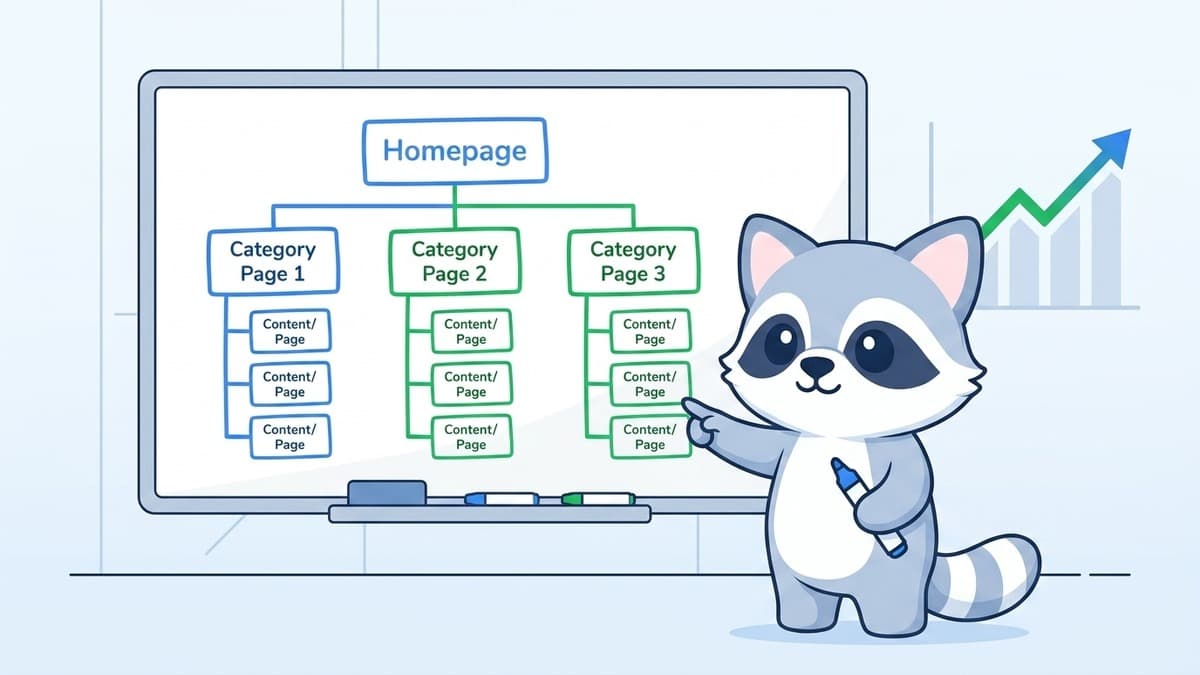
The goal is a flat architecture: as few clicks as possible between your homepage and every other page on your site.
The ideal structure looks like a pyramid:
- Level 1: Homepage
- Level 2: Category and service pages (key money pages)
- Level 3: Blog posts, product pages, subcategory pages
- Level 4: Very granular content (specific product variants, tag pages, etc.)
Most pages should live at Level 3 or above. If you have important content buried at Level 5 or 6, Google is significantly less likely to crawl it regularly, and even less likely to rank it.
For Singapore businesses running service websites, this typically means: homepage links directly to your service pages, and service pages link to related blog content. Simple, clean, and easy for both Googlebot and users to navigate.
How Internal Links Shape Rankings
Internal links do two things simultaneously: they help users navigate, and they pass link equity between pages.
When your homepage links to a page, it passes some of its authority to that page. When that page links to another, some authority flows there too. The pages that receive the most internal links from the most authoritative pages on your site get the most equity, and tend to rank best.
This is why the pages in your main navigation are almost always your most competitive pages. They receive direct links from every page that includes the nav, which means enormous link equity accumulation over time.
Use this intentionally. If you want a specific service page to rank, link to it frequently from your blog content using relevant anchor text. Not "click here." Descriptive anchor text that tells Google what the linked page is about.
For example, our articles consistently link to SEO services in Singapore from contextually relevant places in the content. That's intentional internal linking working as it should.
URL Structure: Clean, Logical, Hierarchical
Your URL structure should mirror your site architecture. Clean URLs are:
- Short
- Descriptive (tells you what the page is about)
- Hierarchical (parent/child relationship visible in the URL)
- Consistent
Good: example.com/services/local-seo/ Bad: example.com/page?id=2847&cat=3
For blogs: example.com/blog/topic-name/ For e-commerce: example.com/category/subcategory/product-name/
Avoid dynamically generated URLs with session IDs or tracking parameters in the URL structure. These create duplicate content problems and waste crawl budget.
If your site has a messy URL structure inherited from an old CMS, changing URLs requires careful planning. Every changed URL needs a 301 redirect from the old version, and every internal link needs updating. Get this wrong and you create the exact crawl errors we covered in our previous article on fixing crawl errors.
Topic Clusters: How Modern SEO Structure Works
The old approach to site structure was to create individual pages targeting individual keywords, each operating independently. Modern SEO architecture is built around topic clusters.
A topic cluster works like this:
- Pillar page: A comprehensive, authoritative page covering a broad topic. For example, a complete guide to SEO for Singapore businesses.
- Cluster pages: Individual articles or pages that cover subtopics in depth. Each cluster page links back to the pillar page, and the pillar page links to all cluster pages.
- Internal linking: Tight, bidirectional linking between the pillar and all cluster pages signals to Google that this site has deep, interconnected expertise on the topic.
This structure benefits both users (easy to navigate between related content) and Google (clear signals about topical authority).
For an AI SEO agency in Singapore, a topic cluster might include:
- Pillar: What is SEO and how does it work (see our SEO fundamentals guide)
- Clusters: keyword research, on-page SEO, technical SEO, local SEO, link building
Each cluster page links back to the pillar, and the pillar links to each cluster. The more comprehensive and well-linked this structure is, the more authority Google assigns to the entire topic.
Navigation: What Goes Where
Your navigation structure is one of the clearest signals you can send Google about what's important on your site.
Main navigation: Only your most important pages. Service pages, key category pages, contact page. If you have 20 items in your main nav, you're diluting the signal. Aim for 5-8 main navigation items maximum.
Footer: Useful for secondary links, resource pages, legal pages. Footer links pass equity too, though less than main nav or in-content links.
Breadcrumbs: For sites with multiple levels (e-commerce, large content sites), breadcrumbs help users navigate and also add structured data that Google can use to display path information in search results.
Sidebar links: Common on blogs and content-heavy sites. Good for linking to popular posts and related content. Don't overload sidebars with dozens of links, as this dilutes the value.
Avoiding Common Architecture Mistakes
Orphan pages: Pages with no internal links pointing to them. Google may never find or index them. After publishing any new page, make sure at least a few other relevant pages link to it.
Duplicate content from URL parameters: Filters, sorting options, and pagination can create multiple URLs with identical content. Use canonical tags or parameter handling in Google Search Console to manage this.
Inconsistent navigation: Navigation that changes between sections of your site, or that doesn't include your most important pages, creates confusion for both users and crawlers.
Deep pagination: Blog archive pages at /page/15/ or product listings that go 10 pages deep. These pages carry almost no value. Use rel="next" and rel="prev" tags or implement infinite scroll with proper JavaScript rendering.
Too many tags and categories: WordPress sites especially tend to accumulate hundreds of tag pages over time. These thin pages compete with your real content and drain crawl budget. Audit and prune regularly.
Site Architecture and New Websites
If you're building a new site, architecture decisions are much easier to implement correctly from the start than to retrofit later. Our guide on SEO when building a website covers this in more detail.
The core principle: plan your URL structure, navigation, and internal linking strategy before you start building. Write it down. Every new page you publish should have a defined place in the hierarchy and at least a few planned internal links.
How Architecture Connects to Everything Else
Good site architecture amplifies every other SEO investment. Your SEO copywriting performs better when the pages it's on receive proper internal link equity. Your backlinks are more valuable when they point to a well-structured site that distributes authority efficiently. Your local SEO results improve when your location pages are clearly structured and internally linked.
Think of architecture as the infrastructure. Everything else, content, links, technical optimisation, runs on top of it.
If you want a professional review of your site's architecture and an actionable restructuring plan, talk to our team. A well-structured site is one of the highest-leverage investments you can make in your long-term rankings.