

More content is better for SEO. More pages mean more chances to rank. More articles mean more keywords covered. This is conventional wisdom, and like a lot of conventional wisdom in SEO, it is only partially true.
The reality is that a site full of weak, outdated, or duplicate content can actively drag down your rankings. Google evaluates the overall quality of your site, not just individual pages. If a significant chunk of your pages are thin, irrelevant, or duplicative, they create noise that dilutes your site's overall authority. Content pruning is the process of cleaning up that noise.
Used correctly, pruning can be one of the highest-leverage SEO activities available to a growing website. Sites that have committed to it often see broad ranking improvements within weeks of implementation.
Key Takeaways
- Google assesses site quality holistically, weak pages can drag down strong ones
- Content pruning means deciding what to keep, what to update, what to consolidate, and what to delete
- Not all pruning means deletion: merging weak pages into a stronger one often performs better than deleting
- Crawl budget is finite; thin and duplicate content wastes it on pages that should not be crawled
- A quarterly content audit is one of the most underused SEO habits for established sites
Why Weak Content Hurts Your Whole Site
Google's Panda algorithm update (now baked into the core algorithm) specifically targeted sites with low-quality content. The signal Google uses is not just "is this page good?", it is closer to "is this site good?" A high ratio of low-quality pages to quality pages can suppress the entire domain.
Think of it like a classroom graded on the average mark. Even if you have ten brilliant students, twenty underperforming students will drag the class average down. Your site works similarly. Strong, well-ranking pages can carry only so much of the load before the weaker pages start anchoring everything.
This is particularly common on older sites, blogs that have been publishing for years, or e-commerce sites with thousands of product pages. Over time, content accumulates. Some of it ages out of relevance. Some was never strong to begin with. Without regular pruning, it sits there, consuming crawl budget, diluting authority, and potentially suppressing your better pages.
For the technical side of how crawl budget works and why it matters, our guide to fixing crawl errors is a useful companion to this article.
What to Actually Do: The Four Options
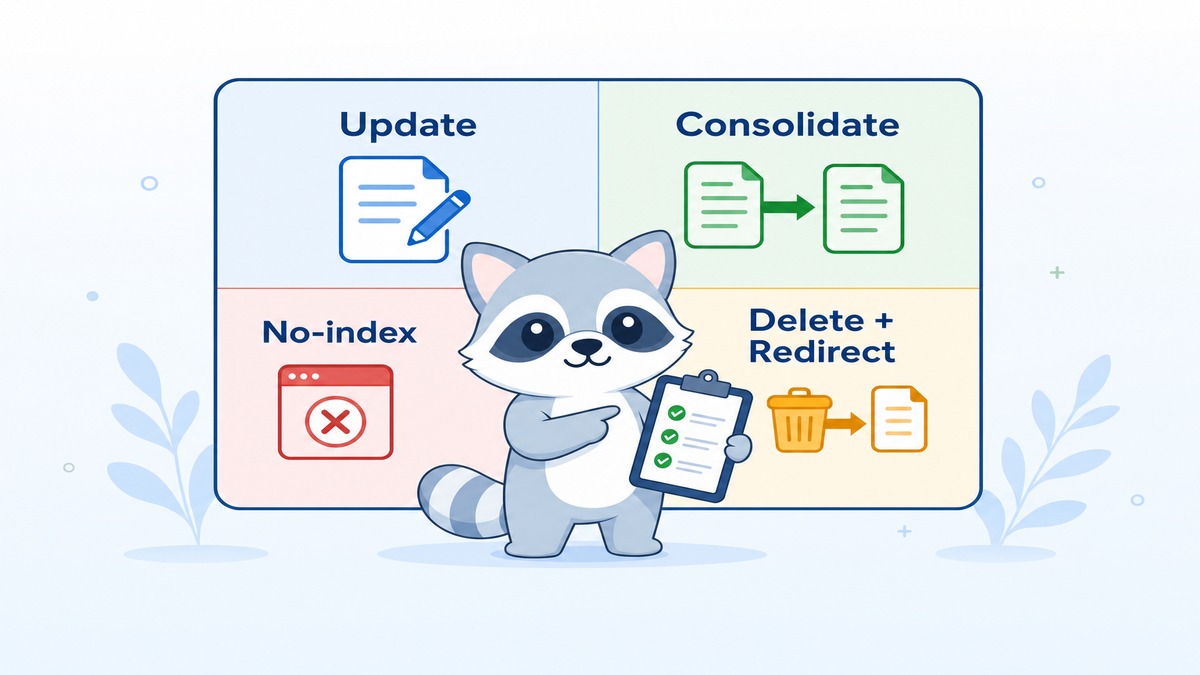
When you encounter a weak page, you have four choices. Which one you pick depends on the page's traffic, backlinks, and content quality.
1. Keep and update If a page once ranked or still has some traffic, but the content is dated or thin, updating it is usually the right call. Add depth, update statistics, expand the target keyword list, improve the structure. Refreshed content often climbs quickly, because Google already has the page indexed and just needs a reason to rank it higher.
2. Consolidate (merge) If you have multiple thin pages covering the same topic, merging them into a single comprehensive page is more powerful than keeping any one of them. Delete the weaker pages, 301 redirect them to the new merged page, and pass any link equity to the consolidated piece.
3. No-index Some pages need to exist on your site for functional reasons (thank-you pages, archive pages, category filters) but should not appear in Google Search. Setting these to noindex keeps them out of Google's index without deleting them. This is a common fix for e-commerce sites with hundreds of filtered search result pages.
4. Delete (with 301 redirect) For pages with no traffic, no backlinks, and genuinely no useful content, deletion is appropriate. Always redirect deleted pages to the most relevant remaining page. Do not delete a page and leave a 404, that wastes any link equity the page had accumulated.
How to Identify Pages Worth Pruning
You need data before you start deleting. Guessing which pages to cut is risky. Here is how to build a clear picture.
Pull traffic data from Google Analytics Export a list of all your pages with their traffic over the past 12 months. Pages with zero or near-zero organic traffic are your first candidates for review.
Check ranking data in Google Search Console Google Search Console shows you which pages are receiving impressions and clicks. Pages with impressions but no clicks may need better titles and meta descriptions (covered in our piece on writing meta descriptions that earn clicks). Pages with neither may be candidates for pruning.
Look for thin content Pages under 300 words with no images, no links, and no engagement are usually thin. They rarely rank for anything meaningful and contribute to that average-quality problem.
Identify duplicate or near-duplicate content Two blog posts covering the same topic in similar ways are both weaker than one comprehensive post would be. Tools like Screaming Frog and Siteliner surface duplicate and similar content across your site.
Check for cannibalisation If multiple pages are competing for the same keyword, they are splitting your ranking potential instead of concentrating it. Consolidate cannibalising pages into a single definitive piece.
The Crawl Budget Argument for Pruning
Every time Google crawls your site, it uses a portion of your crawl budget. This budget is not infinite. For large sites, it is a real constraint.
If your site has 500 pages and 300 of them are thin, duplicate, or outdated, Google is spending a significant chunk of its crawl allocation on pages that contribute nothing. Those are resources that could instead be directed at your most valuable, rankable pages.
Pruning low-value pages reduces the number of pages Google needs to crawl, which means it can crawl your important pages more frequently and keep them fresher in the index. This is particularly impactful for sites that publish content regularly, news sites, active blogs, e-commerce sites with frequently updated inventory.
For a broader look at how your site structure affects crawl efficiency, revisit our guide on site architecture and website structure.
What to Expect After Pruning
If you prune well, the impact is often felt quickly. Within a few weeks of a pruning exercise, many sites see:
- Overall organic traffic increases as remaining pages rank more strongly
- Better crawl coverage of high-priority pages
- Improved average time-on-site and lower bounce rates (because lower-quality pages were often the source of those negative engagement signals)
- Ranking improvements for pages that were cannibalised by content you consolidated
That said, pruning should be done carefully. Do not delete pages in bulk without checking for backlinks first. A page with strong backlinks should be redirected, not deleted, or the content should be updated significantly before it is removed.
Building a Content Audit Habit
The best content pruning is not a one-time event. It is a quarterly habit.
Every 3-6 months, pull your content performance data and review which pages are contributing and which are dragging. This does not have to be a massive project. Even a two-hour audit session per quarter, focused on your lowest-performing pages, can prevent the low-quality content accumulation that happens passively on growing sites.
Our SEO audit process covers the broader framework for regular SEO health checks, of which content auditing is a major component.
Pruning as Part of a Bigger On-Page Strategy
Content pruning does not work in isolation. It is most effective when paired with strong on-page SEO on the pages you keep: good image optimisation (covered in our image SEO guide), proper meta descriptions, clean internal linking, and structured content that serves both users and search engines.
The goal is not just a smaller site. It is a higher-quality site, where every page that exists has a reason to exist and is pulling its weight.
If you want a professional content audit and pruning strategy for your site, working with a Singapore SEO expert means someone looks at the whole picture rather than chasing individual keywords. If you are looking for SEO services in Singapore that treat your site as a whole, let us know. Our GEO agency will identify exactly which pages are helping, which are hurting, and what the fastest path to better rankings looks like for you.